> ## Documentation Index
> Fetch the complete documentation index at: https://docs.meld.io/llms.txt
> Use this file to discover all available pages before exploring further.
# Full Integration Guide
> End-to-end guide for building your own buy (on-ramp) and sell (off-ramp) UI on top of Meld's White-Label API.
# Build Your Own UI with Meld APIs
This guide is for developers building a custom crypto interface on top of Meld's White-Label API. You call Meld directly with `Authorization: BASIC {apiKey}` and own every screen — country selection, amounts, payment methods, quotes, and transaction tracking — while Meld handles pricing, provider routing, sessions, and webhooks, and the selected provider handles KYC, payment collection, and compliance.
You'll learn the exact sequence of API calls for **both directions**:
* **On-ramp (buy)** — fiat → crypto, `category = CRYPTO_ONRAMP`, session `BUY`.
* **Off-ramp (sell)** — crypto → fiat, `category = CRYPTO_OFFRAMP`, session `SELL`.
Discovery is documented once in [The discovery model](#the-discovery-model), then each direction has its own ordered flow section that shows only its ordering, session type, and (for sell) the deposit-address step.
## Before you begin
* ✅ **API key** from the Meld dashboard (see [White-Label Quickstart](/docs/stablecoins/white-label-api-integration/whitelabel-quickstart) Step 1)
* ✅ **Webhook endpoint** configured (recommended; you can also poll the API)
* ✅ **Basic understanding** of REST APIs and JSON
* ✅ **Sandbox environment** — base URL `https://api-sb.meld.io` (production is `https://api.meld.io`)
Every request sends:
```text theme={null}
Authorization: BASIC {apiKey}
Accept: application/json
Content-Type: application/json # on requests with a body
Meld-Version: 2026-02-03
```
Sandbox and production credentials, base URLs, and widget URLs are separate. Develop against `https://api-sb.meld.io` until your flow is ready, then switch credentials and the base URL to `https://api.meld.io` to go live.
**Important:** This is White-Label API Integration, NOT Meld Checkout Integration (Public Key URL). This approach requires custom UI development and API integration.
**CRITICAL: API Changes & Compatibility**
**Non-Breaking Changes (No Versioning):**
* New fields may be added to API responses at any time
* Your system MUST handle unexpected fields gracefully
* Avoid strict JSON validation that rejects unknown properties
**Breaking Changes (Versioned):**
* Field modifications or deletions will be versioned
* Released approximately with advance notice
**Required Actions:**
* ✅ Use flexible JSON parsing (ignore unknown fields)
* ✅ Implement defensive coding practices
* ✅ Test with mock responses containing extra fields
**IMPORTANT: Automatic Provider Management**
**Automatic Additions:**
* Meld may automatically enable providers for your account based on:
* Conversion rates and user success
* Competitive pricing
* Geographic coverage for your users
**Automatic Removals:**
* Providers may be disabled due to:
* Compliance or regulatory issues
* Technical problems or outages
* Provider service interruptions
**Manual Control:**
* Contact Meld to opt out of automatic management
* Request specific provider additions/removals
* Set custom provider preferences for your account
## Technical Architecture
Your UI talks only to Meld's APIs for discovery, pricing, and sessions. When the user is ready to pay (buy) or get paid (sell), you hand off to the selected provider's hosted UI, then track the result through webhooks and the transactions endpoint.
```text theme={null}
┌─────────────┐ ┌─────────────┐ ┌─────────────┐ ┌─────────────┐
│ Your UI │◄──►│ Meld APIs │◄──►│ Provider UI │───►│ Your UI │
│ │ │ │ │ (Widget) │ │ │
├─────────────┤ ├─────────────┤ ├─────────────┤ ├─────────────┤
│ • Discovery │ │ • Routing │ │ • Payment │ │ • Status │
│ • Quotes │ │ • Pricing │ │ • KYC │ │ • Results │
│ • Selection │ │ • Sessions │ │ • Compliance│ │ • Tracking │
│ • Launch │ │ • Webhooks │ │ • Payout │ │ │
└─────────────┘ └─────────────┘ └─────────────┘ └─────────────┘
```
**Off-ramp variant:** the sell flow adds one handoff back to your UI. After the provider session is created and the user confirms in the provider UI, Meld returns a **deposit address** on the transaction. Your UI must display it and instruct the user to send the exact crypto amount to it. See [Off-ramp flow](#off-ramp-flow-sell) Step 6.
## The discovery model
All discovery is parameterized by a `category`. Retail ramp uses exactly two:
| Direction | `category` | Session type | Currency flow |
| --------- | ---------------- | ------------ | ------------- |
| Buy | `CRYPTO_ONRAMP` | `BUY` | fiat → crypto |
| Sell | `CRYPTO_OFFRAMP` | `SELL` | crypto → fiat |
**Routes follow direction, not fiat/crypto.** On `GET /network-partner/supported/routes/{category}/{countryCode}/{sourceCurrencyCode}/{destinationCurrencyCode}`:
* **On-ramp:** `source = fiat`, `destination = crypto` → `.../CRYPTO_ONRAMP/US/USD/USDC`
* **Off-ramp:** `source = crypto`, `destination = fiat` → `.../CRYPTO_OFFRAMP/US/USDC/USD`
Putting the segments in the wrong order returns **HTTP 200 with an empty `[]`** — not a 404 — which silently starves payment-method and limit discovery. Always order by direction.
### Upgrading from the Service Provider API?
If you previously integrated against the legacy `/service-providers/*` discovery endpoints, they are replaced by the category-scoped `/network-partner/*` family used throughout this guide.
The three transaction endpoints are unchanged: `POST /payments/crypto/quote`, `POST /crypto/session/widget`, and `GET /payments/transactions/{transactionId}`.
Swap variants (`CRYPTO_ONRAMP_SWAP` / `CRYPTO_OFFRAMP_SWAP`) and virtual-account categories also exist but are out of scope for this retail buy/sell guide.
## Discovery endpoint reference
These five endpoints back both flows. Each example shows the on-ramp and off-ramp variant so you can see where shapes and ordering differ.
### Supported countries
```text theme={null}
GET /network-partner/supported/countries?category={CATEGORY}
```
| Query param | Required | Allowed values |
| ----------- | -------- | ----------------------------------- |
| `category` | yes | `CRYPTO_ONRAMP` or `CRYPTO_OFFRAMP` |
```bash On-ramp theme={null}
curl 'https://api-sb.meld.io/network-partner/supported/countries?category=CRYPTO_ONRAMP' \
-H 'Authorization: BASIC {apiKey}' \
-H 'Accept: application/json'
```
```bash Off-ramp theme={null}
curl 'https://api-sb.meld.io/network-partner/supported/countries?category=CRYPTO_OFFRAMP' \
-H 'Authorization: BASIC {apiKey}' \
-H 'Accept: application/json'
```
```json Response theme={null}
{
"countries": [
{
"countryCode": "US",
"name": "United States",
"flag": "https://cdn.meld.io/images-country/US/flag.svg",
"subdivisions": ["US-CA", "US-NY"]
},
{
"countryCode": "DE",
"name": "Germany",
"flag": "https://cdn.meld.io/images-country/DE/flag.svg"
}
]
}
```
* The set of countries can differ by direction.
* **`flag`** is a hosted image URL, not an emoji — render it as an `![]() `.
* **`subdivisions`** returns ISO 3166-2 codes (e.g. `US-CA`) when a country has regional coverage differences. Collect the user's state/region and pass it as `subdivision` to [Supported routes](#supported-routes).
### Country defaults
```text theme={null}
GET /network-partner/defaults/{country}/{category}
```
Country (ISO 3166-1 alpha-2, e.g. `US`) and category (`CRYPTO_ONRAMP` or `CRYPTO_OFFRAMP`) are path params. Returns a single object with the preselected pay-with / payout currency and payment methods for that country.
```bash On-ramp theme={null}
curl 'https://api-sb.meld.io/network-partner/defaults/US/CRYPTO_ONRAMP' \
-H 'Authorization: BASIC {apiKey}'
```
```bash Off-ramp theme={null}
curl 'https://api-sb.meld.io/network-partner/defaults/DE/CRYPTO_OFFRAMP' \
-H 'Authorization: BASIC {apiKey}'
```
```json On-ramp response theme={null}
{
"countryCode": "US",
"category": "CRYPTO_ONRAMP",
"currencyCode": "USD",
"paymentMethods": ["CREDIT_DEBIT_CARD", "APPLE_PAY", "ROBINHOOD_BUYING_POWER"]
}
```
```json Off-ramp response theme={null}
{
"countryCode": "DE",
"category": "CRYPTO_OFFRAMP",
"currencyCode": "EUR",
"paymentMethods": ["SEPA"]
}
```
Fall back to the first item from `/network-partner/supported/currencies` and `/network-partner/supported/payment-methods` if the response omits a field for a given country/category.
### Supported currencies
```text theme={null}
GET /network-partner/supported/currencies?category={CATEGORY}&country={c}&type={FIAT|CRYPTO}
```
One endpoint serves both fiat and crypto, selected by `type`.
| Query param | Required | Meaning |
| ---------------------- | -------- | ------------------------------------------------------------------------ |
| `category` | yes | `CRYPTO_ONRAMP` or `CRYPTO_OFFRAMP` |
| `country` | yes | ISO alpha-2 |
| `type` | yes | `FIAT` or `CRYPTO` — selects which side of the list you get |
| `network` | no | chain/network code (e.g. `ETHEREUM`, `SOLANA`) to filter crypto by chain |
| `partner` | no | provider id to restrict to one partner's catalog |
| `paymentType` | no | broad bucket (e.g. `CARD`) |
| `providerCurrencyCode` | no | provider-specific currency code |
Each currency is `{ currencyCode, name, decimalPlaces, type, symbol, chainCode?, contract? }`.
* **`currencyCode`** — the ticker/id you send downstream (e.g. `USD`, `USDC`).
* **`decimalPlaces`** — use for client-side formatting of the amount input.
* **`symbol`** — a hosted image URL for the currency logo (not a ticker). Render as an `
`.
* **`subdivisions`** returns ISO 3166-2 codes (e.g. `US-CA`) when a country has regional coverage differences. Collect the user's state/region and pass it as `subdivision` to [Supported routes](#supported-routes).
### Country defaults
```text theme={null}
GET /network-partner/defaults/{country}/{category}
```
Country (ISO 3166-1 alpha-2, e.g. `US`) and category (`CRYPTO_ONRAMP` or `CRYPTO_OFFRAMP`) are path params. Returns a single object with the preselected pay-with / payout currency and payment methods for that country.
```bash On-ramp theme={null}
curl 'https://api-sb.meld.io/network-partner/defaults/US/CRYPTO_ONRAMP' \
-H 'Authorization: BASIC {apiKey}'
```
```bash Off-ramp theme={null}
curl 'https://api-sb.meld.io/network-partner/defaults/DE/CRYPTO_OFFRAMP' \
-H 'Authorization: BASIC {apiKey}'
```
```json On-ramp response theme={null}
{
"countryCode": "US",
"category": "CRYPTO_ONRAMP",
"currencyCode": "USD",
"paymentMethods": ["CREDIT_DEBIT_CARD", "APPLE_PAY", "ROBINHOOD_BUYING_POWER"]
}
```
```json Off-ramp response theme={null}
{
"countryCode": "DE",
"category": "CRYPTO_OFFRAMP",
"currencyCode": "EUR",
"paymentMethods": ["SEPA"]
}
```
Fall back to the first item from `/network-partner/supported/currencies` and `/network-partner/supported/payment-methods` if the response omits a field for a given country/category.
### Supported currencies
```text theme={null}
GET /network-partner/supported/currencies?category={CATEGORY}&country={c}&type={FIAT|CRYPTO}
```
One endpoint serves both fiat and crypto, selected by `type`.
| Query param | Required | Meaning |
| ---------------------- | -------- | ------------------------------------------------------------------------ |
| `category` | yes | `CRYPTO_ONRAMP` or `CRYPTO_OFFRAMP` |
| `country` | yes | ISO alpha-2 |
| `type` | yes | `FIAT` or `CRYPTO` — selects which side of the list you get |
| `network` | no | chain/network code (e.g. `ETHEREUM`, `SOLANA`) to filter crypto by chain |
| `partner` | no | provider id to restrict to one partner's catalog |
| `paymentType` | no | broad bucket (e.g. `CARD`) |
| `providerCurrencyCode` | no | provider-specific currency code |
Each currency is `{ currencyCode, name, decimalPlaces, type, symbol, chainCode?, contract? }`.
* **`currencyCode`** — the ticker/id you send downstream (e.g. `USD`, `USDC`).
* **`decimalPlaces`** — use for client-side formatting of the amount input.
* **`symbol`** — a hosted image URL for the currency logo (not a ticker). Render as an `![]() `.
* **`chainCode`** / **`contract`** — disambiguate tokens on multi-chain networks.
```bash On-ramp fiat theme={null}
curl 'https://api-sb.meld.io/network-partner/supported/currencies?category=CRYPTO_ONRAMP&country=US&type=FIAT' \
-H 'Authorization: BASIC {apiKey}'
```
```bash On-ramp crypto theme={null}
curl 'https://api-sb.meld.io/network-partner/supported/currencies?category=CRYPTO_ONRAMP&country=US&type=CRYPTO&network=ETHEREUM' \
-H 'Authorization: BASIC {apiKey}'
```
```bash Off-ramp crypto theme={null}
curl 'https://api-sb.meld.io/network-partner/supported/currencies?category=CRYPTO_OFFRAMP&country=DE&type=CRYPTO' \
-H 'Authorization: BASIC {apiKey}'
```
```bash Off-ramp fiat theme={null}
curl 'https://api-sb.meld.io/network-partner/supported/currencies?category=CRYPTO_OFFRAMP&country=DE&type=FIAT' \
-H 'Authorization: BASIC {apiKey}'
```
```json On-ramp crypto response theme={null}
{
"currencies": [
{
"currencyCode": "USDC",
"name": "USD Coin",
"decimalPlaces": 6,
"type": "CRYPTO",
"symbol": "https://cdn.meld.io/images-currency/crypto/USDC/symbol.png",
"chainCode": "ETH",
"contract": "0xA0b86991c6218b36c1d19D4a2e9Eb0cE3606eB48"
},
{
"currencyCode": "ETH",
"name": "Ethereum",
"decimalPlaces": 18,
"type": "CRYPTO",
"symbol": "https://cdn.meld.io/images-currency/crypto/ETH/symbol.png",
"chainCode": "ETH"
}
]
}
```
### Supported payment methods
```text theme={null}
GET /network-partner/supported/payment-methods?category={CATEGORY}&country={c}¤cyCode={f}
```
| Query param | Required | Meaning |
| -------------- | -------- | --------------------------------------------------------------------------------- |
| `category` | yes | `CRYPTO_ONRAMP` or `CRYPTO_OFFRAMP` |
| `country` | yes | ISO alpha-2 |
| `currencyCode` | yes | the **fiat** code — on-ramp: the pay-with currency; off-ramp: the payout currency |
Returns a **bare array** of `{ countryCode, providerMethod, method, name, type, logo?, headlessSupported? }`.
* **`method`** — the canonical id (e.g. `ACH`, `SEPA`, `CREDIT_DEBIT_CARD`). This is the value you send downstream as `paymentMethodType`.
* **`name`** — human-readable display label ("ACH Bank Transfer"). **Never send `name` to Meld.**
* **`headlessSupported`** — `true` if the rail supports a headless (server-to-server, no provider UI) checkout for this method. Prefer these when your flow doesn't need the provider's hosted UI.
**Send `method`, never `name`.** Sending a display label or the wrong rail for a country/currency yields `NO_VALID_QUOTES`.
```bash On-ramp theme={null}
curl 'https://api-sb.meld.io/network-partner/supported/payment-methods?category=CRYPTO_ONRAMP&country=US¤cyCode=USD' \
-H 'Authorization: BASIC {apiKey}'
```
```bash Off-ramp theme={null}
curl 'https://api-sb.meld.io/network-partner/supported/payment-methods?category=CRYPTO_OFFRAMP&country=US¤cyCode=USD' \
-H 'Authorization: BASIC {apiKey}'
```
```json Off-ramp response (payout rails) theme={null}
[
{
"countryCode": "US",
"providerMethod": "ach",
"method": "ACH",
"name": "ACH Bank Transfer",
"type": "BANK_TRANSFER",
"headlessSupported": true,
"logo": {
"dark": "https://cdn.meld.io/ach-dark.svg",
"light": "https://cdn.meld.io/ach-light.svg"
}
},
{
"countryCode": "US",
"providerMethod": "card_payout",
"method": "PAYOUT_TO_CARD",
"name": "Instant Card Payout",
"type": "CARD"
}
]
```
### Supported routes
```text theme={null}
GET /network-partner/supported/routes/{category}/{countryCode}/{sourceCurrencyCode}/{destinationCurrencyCode}
```
Routes return the partners and payment methods that serve a currency pair, **and** the per-method min/max limits (which replaced the standalone limits endpoint).
* **On-ramp:** `source = fiat`, `destination = crypto` → `.../CRYPTO_ONRAMP/US/USD/USDC`
* **Off-ramp:** `source = crypto`, `destination = fiat` → `.../CRYPTO_OFFRAMP/US/USDC/USD`
| Query param | Meaning |
| --------------- | ----------------------------------------------------------------------- |
| `partners` | comma-joined partner allow-list, e.g. `transak,banxa` |
| `paymentMethod` | a `method` id to filter routes by rail |
| `paymentType` | broad bucket, e.g. `CARD` |
| `subdivision` | state/region (e.g. US state) — replaces the legacy `states[]` discovery |
Each route is:
```text theme={null}
Route = { partner, source, destination, paymentMethods: RoutePaymentMethod[], kycLimits?: [] }
RoutePaymentMethod = {
paymentType, // broad bucket: CARD, MOBILE_WALLET, BANK_TRANSFER
name, // canonical method id — SAME value as `method` from /supported/payment-methods (send as paymentMethodType)
partnerMethodName, // provider-specific label (informational only)
limits: { currencyCode, min, max } | null, // replaces the legacy limits endpoint
logo?: { dark, light },
headlessSupported? // true = rail supports headless checkout
}
```
```bash On-ramp (fiat → crypto) theme={null}
curl 'https://api-sb.meld.io/network-partner/supported/routes/CRYPTO_ONRAMP/US/USD/USDC?paymentType=CARD' \
-H 'Authorization: BASIC {apiKey}'
```
```bash Off-ramp (crypto → fiat) theme={null}
curl 'https://api-sb.meld.io/network-partner/supported/routes/CRYPTO_OFFRAMP/US/USDC/USD' \
-H 'Authorization: BASIC {apiKey}'
```
```json On-ramp response theme={null}
[
{
"partner": "TRANSAK",
"source": "USD",
"destination": "USDC",
"paymentMethods": [
{
"paymentType": "CARD",
"name": "CREDIT_DEBIT_CARD",
"partnerMethodName": "credit_debit_card",
"limits": { "currencyCode": "USD", "min": 30, "max": 20000 },
"headlessSupported": false
},
{
"paymentType": "MOBILE_WALLET",
"name": "APPLE_PAY",
"partnerMethodName": "apple_pay",
"limits": { "currencyCode": "USD", "min": 30, "max": 2000 }
}
],
"kycLimits": []
}
]
```
```json Off-ramp response theme={null}
[
{
"partner": "TRANSAK",
"source": "USDC",
"destination": "USD",
"paymentMethods": [
{
"paymentType": "BANK_TRANSFER",
"name": "ACH",
"partnerMethodName": "ach_payout",
"limits": { "currencyCode": "USD", "min": 10, "max": 10000 },
"headlessSupported": true
}
],
"kycLimits": []
}
]
```
To validate the user's amount, read `route.paymentMethods[].limits` for the chosen partner + method. The `currencyCode` on `limits` tells you which currency the min/max are expressed in: for on-ramp it's the fiat the user pays; for off-ramp it's the fiat the user receives. Because limits live on the route, a buy route and a sell route for the same pair can have different min/max.
**`kycLimits`** — an optional array of tier-based limits that some partners apply on top of the per-method `limits` (e.g. higher caps after enhanced KYC). Usually empty; treat as advisory unless a partner returns entries.
## On-ramp flow (buy)
`category = CRYPTO_ONRAMP` throughout. Currency flow is fiat → crypto, session type is `BUY`.
Auto-detect the user's country from their device/browser (geolocation or IP) where possible. For a manual override list and availability check, call:
```text theme={null}
GET /network-partner/supported/countries?category=CRYPTO_ONRAMP
```
Then fetch defaults to preselect the pay-with currency and rail:
```text theme={null}
GET /network-partner/defaults/{country}/CRYPTO_ONRAMP
```
Populate the pay-with currency menu and the buy-asset selector:
```text theme={null}
GET /network-partner/supported/currencies?category=CRYPTO_ONRAMP&country={country}&type=FIAT
GET /network-partner/supported/currencies?category=CRYPTO_ONRAMP&country={country}&type=CRYPTO
```
Use `decimalPlaces` to format the amount input, `currencyCode`/`name` for the label, `symbol` (image URL) for the logo, and `chainCode`/`contract` to disambiguate multi-chain tokens.
`.
* **`chainCode`** / **`contract`** — disambiguate tokens on multi-chain networks.
```bash On-ramp fiat theme={null}
curl 'https://api-sb.meld.io/network-partner/supported/currencies?category=CRYPTO_ONRAMP&country=US&type=FIAT' \
-H 'Authorization: BASIC {apiKey}'
```
```bash On-ramp crypto theme={null}
curl 'https://api-sb.meld.io/network-partner/supported/currencies?category=CRYPTO_ONRAMP&country=US&type=CRYPTO&network=ETHEREUM' \
-H 'Authorization: BASIC {apiKey}'
```
```bash Off-ramp crypto theme={null}
curl 'https://api-sb.meld.io/network-partner/supported/currencies?category=CRYPTO_OFFRAMP&country=DE&type=CRYPTO' \
-H 'Authorization: BASIC {apiKey}'
```
```bash Off-ramp fiat theme={null}
curl 'https://api-sb.meld.io/network-partner/supported/currencies?category=CRYPTO_OFFRAMP&country=DE&type=FIAT' \
-H 'Authorization: BASIC {apiKey}'
```
```json On-ramp crypto response theme={null}
{
"currencies": [
{
"currencyCode": "USDC",
"name": "USD Coin",
"decimalPlaces": 6,
"type": "CRYPTO",
"symbol": "https://cdn.meld.io/images-currency/crypto/USDC/symbol.png",
"chainCode": "ETH",
"contract": "0xA0b86991c6218b36c1d19D4a2e9Eb0cE3606eB48"
},
{
"currencyCode": "ETH",
"name": "Ethereum",
"decimalPlaces": 18,
"type": "CRYPTO",
"symbol": "https://cdn.meld.io/images-currency/crypto/ETH/symbol.png",
"chainCode": "ETH"
}
]
}
```
### Supported payment methods
```text theme={null}
GET /network-partner/supported/payment-methods?category={CATEGORY}&country={c}¤cyCode={f}
```
| Query param | Required | Meaning |
| -------------- | -------- | --------------------------------------------------------------------------------- |
| `category` | yes | `CRYPTO_ONRAMP` or `CRYPTO_OFFRAMP` |
| `country` | yes | ISO alpha-2 |
| `currencyCode` | yes | the **fiat** code — on-ramp: the pay-with currency; off-ramp: the payout currency |
Returns a **bare array** of `{ countryCode, providerMethod, method, name, type, logo?, headlessSupported? }`.
* **`method`** — the canonical id (e.g. `ACH`, `SEPA`, `CREDIT_DEBIT_CARD`). This is the value you send downstream as `paymentMethodType`.
* **`name`** — human-readable display label ("ACH Bank Transfer"). **Never send `name` to Meld.**
* **`headlessSupported`** — `true` if the rail supports a headless (server-to-server, no provider UI) checkout for this method. Prefer these when your flow doesn't need the provider's hosted UI.
**Send `method`, never `name`.** Sending a display label or the wrong rail for a country/currency yields `NO_VALID_QUOTES`.
```bash On-ramp theme={null}
curl 'https://api-sb.meld.io/network-partner/supported/payment-methods?category=CRYPTO_ONRAMP&country=US¤cyCode=USD' \
-H 'Authorization: BASIC {apiKey}'
```
```bash Off-ramp theme={null}
curl 'https://api-sb.meld.io/network-partner/supported/payment-methods?category=CRYPTO_OFFRAMP&country=US¤cyCode=USD' \
-H 'Authorization: BASIC {apiKey}'
```
```json Off-ramp response (payout rails) theme={null}
[
{
"countryCode": "US",
"providerMethod": "ach",
"method": "ACH",
"name": "ACH Bank Transfer",
"type": "BANK_TRANSFER",
"headlessSupported": true,
"logo": {
"dark": "https://cdn.meld.io/ach-dark.svg",
"light": "https://cdn.meld.io/ach-light.svg"
}
},
{
"countryCode": "US",
"providerMethod": "card_payout",
"method": "PAYOUT_TO_CARD",
"name": "Instant Card Payout",
"type": "CARD"
}
]
```
### Supported routes
```text theme={null}
GET /network-partner/supported/routes/{category}/{countryCode}/{sourceCurrencyCode}/{destinationCurrencyCode}
```
Routes return the partners and payment methods that serve a currency pair, **and** the per-method min/max limits (which replaced the standalone limits endpoint).
* **On-ramp:** `source = fiat`, `destination = crypto` → `.../CRYPTO_ONRAMP/US/USD/USDC`
* **Off-ramp:** `source = crypto`, `destination = fiat` → `.../CRYPTO_OFFRAMP/US/USDC/USD`
| Query param | Meaning |
| --------------- | ----------------------------------------------------------------------- |
| `partners` | comma-joined partner allow-list, e.g. `transak,banxa` |
| `paymentMethod` | a `method` id to filter routes by rail |
| `paymentType` | broad bucket, e.g. `CARD` |
| `subdivision` | state/region (e.g. US state) — replaces the legacy `states[]` discovery |
Each route is:
```text theme={null}
Route = { partner, source, destination, paymentMethods: RoutePaymentMethod[], kycLimits?: [] }
RoutePaymentMethod = {
paymentType, // broad bucket: CARD, MOBILE_WALLET, BANK_TRANSFER
name, // canonical method id — SAME value as `method` from /supported/payment-methods (send as paymentMethodType)
partnerMethodName, // provider-specific label (informational only)
limits: { currencyCode, min, max } | null, // replaces the legacy limits endpoint
logo?: { dark, light },
headlessSupported? // true = rail supports headless checkout
}
```
```bash On-ramp (fiat → crypto) theme={null}
curl 'https://api-sb.meld.io/network-partner/supported/routes/CRYPTO_ONRAMP/US/USD/USDC?paymentType=CARD' \
-H 'Authorization: BASIC {apiKey}'
```
```bash Off-ramp (crypto → fiat) theme={null}
curl 'https://api-sb.meld.io/network-partner/supported/routes/CRYPTO_OFFRAMP/US/USDC/USD' \
-H 'Authorization: BASIC {apiKey}'
```
```json On-ramp response theme={null}
[
{
"partner": "TRANSAK",
"source": "USD",
"destination": "USDC",
"paymentMethods": [
{
"paymentType": "CARD",
"name": "CREDIT_DEBIT_CARD",
"partnerMethodName": "credit_debit_card",
"limits": { "currencyCode": "USD", "min": 30, "max": 20000 },
"headlessSupported": false
},
{
"paymentType": "MOBILE_WALLET",
"name": "APPLE_PAY",
"partnerMethodName": "apple_pay",
"limits": { "currencyCode": "USD", "min": 30, "max": 2000 }
}
],
"kycLimits": []
}
]
```
```json Off-ramp response theme={null}
[
{
"partner": "TRANSAK",
"source": "USDC",
"destination": "USD",
"paymentMethods": [
{
"paymentType": "BANK_TRANSFER",
"name": "ACH",
"partnerMethodName": "ach_payout",
"limits": { "currencyCode": "USD", "min": 10, "max": 10000 },
"headlessSupported": true
}
],
"kycLimits": []
}
]
```
To validate the user's amount, read `route.paymentMethods[].limits` for the chosen partner + method. The `currencyCode` on `limits` tells you which currency the min/max are expressed in: for on-ramp it's the fiat the user pays; for off-ramp it's the fiat the user receives. Because limits live on the route, a buy route and a sell route for the same pair can have different min/max.
**`kycLimits`** — an optional array of tier-based limits that some partners apply on top of the per-method `limits` (e.g. higher caps after enhanced KYC). Usually empty; treat as advisory unless a partner returns entries.
## On-ramp flow (buy)
`category = CRYPTO_ONRAMP` throughout. Currency flow is fiat → crypto, session type is `BUY`.
Auto-detect the user's country from their device/browser (geolocation or IP) where possible. For a manual override list and availability check, call:
```text theme={null}
GET /network-partner/supported/countries?category=CRYPTO_ONRAMP
```
Then fetch defaults to preselect the pay-with currency and rail:
```text theme={null}
GET /network-partner/defaults/{country}/CRYPTO_ONRAMP
```
Populate the pay-with currency menu and the buy-asset selector:
```text theme={null}
GET /network-partner/supported/currencies?category=CRYPTO_ONRAMP&country={country}&type=FIAT
GET /network-partner/supported/currencies?category=CRYPTO_ONRAMP&country={country}&type=CRYPTO
```
Use `decimalPlaces` to format the amount input, `currencyCode`/`name` for the label, `symbol` (image URL) for the logo, and `chainCode`/`contract` to disambiguate multi-chain tokens.
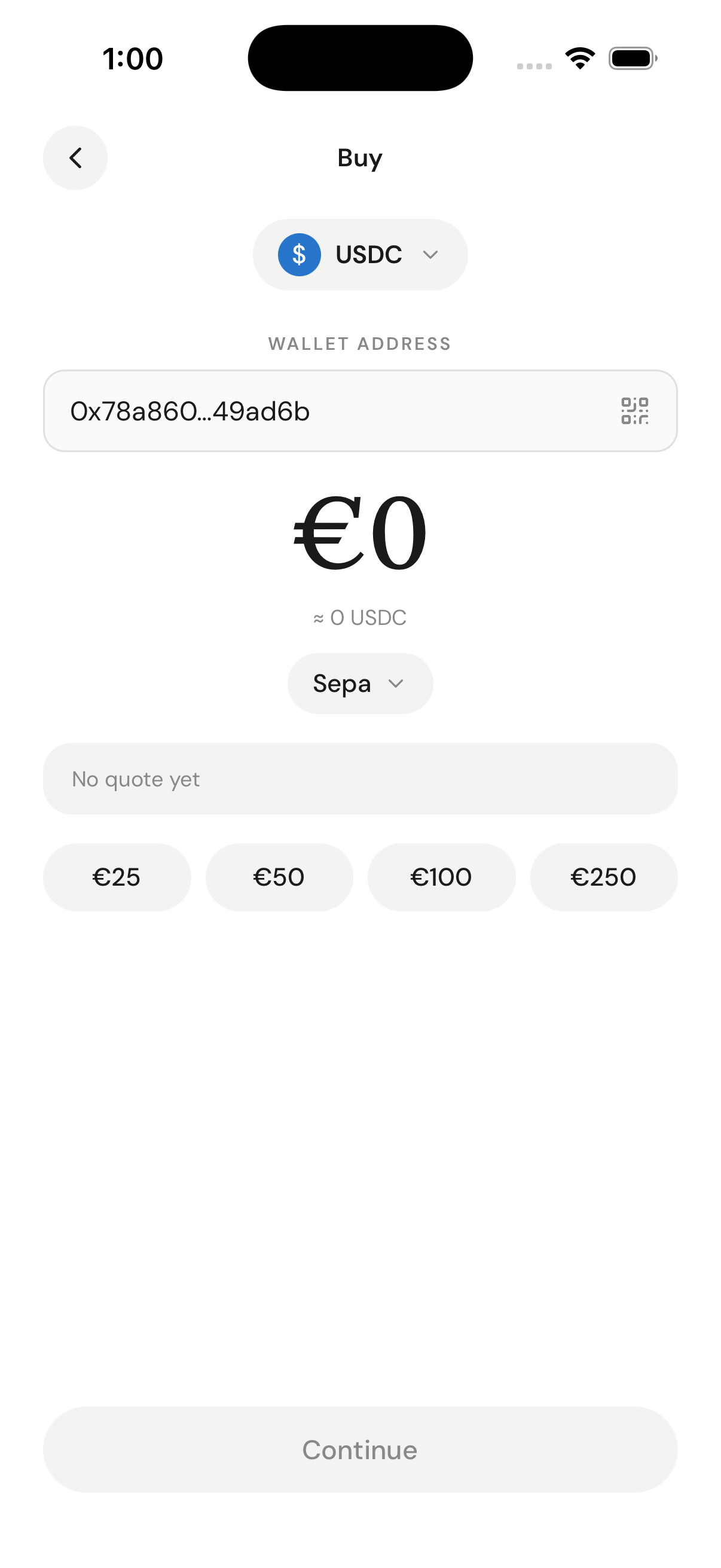 With a fiat → crypto pair selected, fetch the routes that serve it. This returns the selectable rails and their min/max limits. Pass `subdivision` for the US state when applicable.
```text theme={null}
GET /network-partner/supported/routes/CRYPTO_ONRAMP/{country}/{fiat}/{crypto}
```
Consume `route.paymentMethods[].name` (the rails), `...limits.{min,max,currencyCode}` (validate the amount), `partner`, and `headlessSupported`. Alternatively (or in addition), list rails explicitly:
```text theme={null}
GET /network-partner/supported/payment-methods?category=CRYPTO_ONRAMP&country={country}¤cyCode={fiat}
```
Both yield the canonical `method`/`name` id you send as `paymentMethodType`.
Send `walletAddress` on the request — Ramp Intelligence keys off the destination wallet address (not `customerId` / `externalCustomerId`) to rank quotes for the user. On this endpoint `sourceAmount` is a **number**.
```bash theme={null}
curl -X POST 'https://api-sb.meld.io/payments/crypto/quote' \
-H 'Authorization: BASIC {apiKey}' \
-H 'Content-Type: application/json' \
-H 'Accept: application/json' \
-H 'Meld-Version: 2026-02-03' \
-d '{
"countryCode": "US",
"sourceCurrencyCode": "USD",
"destinationCurrencyCode": "USDC",
"sourceAmount": 200,
"paymentMethodType": "CREDIT_DEBIT_CARD",
"externalCustomerId": "user_123",
"walletAddress": "0xfCFAa8059080D01b27ccA2B1fA086df0853397E6"
}'
```
For on-ramp, `sourceCurrencyCode` is fiat and `destinationCurrencyCode` is crypto. Rank the returned `quotes[]` by `rampIntelligence.rampScore` (see [Quote ranking](#quote-ranking-ramp-intelligence)), then let the user pick. Capture the chosen quote's `serviceProvider`.
Pass an optional `serviceProviders: ["TRANSAK", "BANXA"]` array on the request body to restrict which providers can quote (allow-list). Omit it to receive quotes from every provider linked to your API key.
Use the nested `{ sessionType, sessionData }` body. On this endpoint `sessionData.sourceAmount` is a **string** (it was a number on the quote endpoint).
```bash theme={null}
curl -X POST 'https://api-sb.meld.io/crypto/session/widget' \
-H 'Authorization: BASIC {apiKey}' \
-H 'Content-Type: application/json' \
-H 'Accept: application/json' \
-H 'Meld-Version: 2026-02-03' \
-d '{
"sessionType": "BUY",
"sessionData": {
"countryCode": "US",
"sourceCurrencyCode": "USD",
"destinationCurrencyCode": "USDC",
"sourceAmount": "200",
"paymentMethodType": "CREDIT_DEBIT_CARD",
"serviceProvider": "TRANSAK",
"walletAddress": "0xfCFAa8059080D01b27ccA2B1fA086df0853397E6",
"redirectUrl": "https://your-domain.example/transaction-complete"
},
"externalCustomerId": "user_123",
"externalSessionId": "session_456"
}'
```
The response returns `serviceProviderWidgetUrl` (preferred — the provider's hosted checkout), `widgetUrl` (Meld-hosted fallback), `token`, `id`, and `externalSessionId`.
Open `serviceProviderWidgetUrl` (popup or new tab on desktop; redirect on mobile). The provider runs its own KYC and collects payment. Completion is signaled by your `redirectUrl` and/or `postMessage`, but authoritative status comes from webhooks. See [Launch provider UI](#launch-the-provider-ui) and [Track the transaction](#track-the-transaction).
## Off-ramp flow (sell)
`category = CRYPTO_OFFRAMP` throughout. Currency flow is crypto → fiat, session type is `SELL`. The structural differences from buy are flagged inline.
The sell-supported country set can differ from buy. Fetch it and the payout defaults:
```text theme={null}
GET /network-partner/supported/countries?category=CRYPTO_OFFRAMP
GET /network-partner/defaults/{country}/CRYPTO_OFFRAMP
```
Defaults preselect the payout fiat (`currencyCode`) and payout rail (`paymentMethods[]`).
```text theme={null}
GET /network-partner/supported/currencies?category=CRYPTO_OFFRAMP&country={country}&type=CRYPTO
GET /network-partner/supported/currencies?category=CRYPTO_OFFRAMP&country={country}&type=FIAT
```
The `type=CRYPTO` list is what the user can sell; the `type=FIAT` list is what they can receive. Use `decimalPlaces` to format the crypto-units input and show a ≈ fiat preview.
With a fiat → crypto pair selected, fetch the routes that serve it. This returns the selectable rails and their min/max limits. Pass `subdivision` for the US state when applicable.
```text theme={null}
GET /network-partner/supported/routes/CRYPTO_ONRAMP/{country}/{fiat}/{crypto}
```
Consume `route.paymentMethods[].name` (the rails), `...limits.{min,max,currencyCode}` (validate the amount), `partner`, and `headlessSupported`. Alternatively (or in addition), list rails explicitly:
```text theme={null}
GET /network-partner/supported/payment-methods?category=CRYPTO_ONRAMP&country={country}¤cyCode={fiat}
```
Both yield the canonical `method`/`name` id you send as `paymentMethodType`.
Send `walletAddress` on the request — Ramp Intelligence keys off the destination wallet address (not `customerId` / `externalCustomerId`) to rank quotes for the user. On this endpoint `sourceAmount` is a **number**.
```bash theme={null}
curl -X POST 'https://api-sb.meld.io/payments/crypto/quote' \
-H 'Authorization: BASIC {apiKey}' \
-H 'Content-Type: application/json' \
-H 'Accept: application/json' \
-H 'Meld-Version: 2026-02-03' \
-d '{
"countryCode": "US",
"sourceCurrencyCode": "USD",
"destinationCurrencyCode": "USDC",
"sourceAmount": 200,
"paymentMethodType": "CREDIT_DEBIT_CARD",
"externalCustomerId": "user_123",
"walletAddress": "0xfCFAa8059080D01b27ccA2B1fA086df0853397E6"
}'
```
For on-ramp, `sourceCurrencyCode` is fiat and `destinationCurrencyCode` is crypto. Rank the returned `quotes[]` by `rampIntelligence.rampScore` (see [Quote ranking](#quote-ranking-ramp-intelligence)), then let the user pick. Capture the chosen quote's `serviceProvider`.
Pass an optional `serviceProviders: ["TRANSAK", "BANXA"]` array on the request body to restrict which providers can quote (allow-list). Omit it to receive quotes from every provider linked to your API key.
Use the nested `{ sessionType, sessionData }` body. On this endpoint `sessionData.sourceAmount` is a **string** (it was a number on the quote endpoint).
```bash theme={null}
curl -X POST 'https://api-sb.meld.io/crypto/session/widget' \
-H 'Authorization: BASIC {apiKey}' \
-H 'Content-Type: application/json' \
-H 'Accept: application/json' \
-H 'Meld-Version: 2026-02-03' \
-d '{
"sessionType": "BUY",
"sessionData": {
"countryCode": "US",
"sourceCurrencyCode": "USD",
"destinationCurrencyCode": "USDC",
"sourceAmount": "200",
"paymentMethodType": "CREDIT_DEBIT_CARD",
"serviceProvider": "TRANSAK",
"walletAddress": "0xfCFAa8059080D01b27ccA2B1fA086df0853397E6",
"redirectUrl": "https://your-domain.example/transaction-complete"
},
"externalCustomerId": "user_123",
"externalSessionId": "session_456"
}'
```
The response returns `serviceProviderWidgetUrl` (preferred — the provider's hosted checkout), `widgetUrl` (Meld-hosted fallback), `token`, `id`, and `externalSessionId`.
Open `serviceProviderWidgetUrl` (popup or new tab on desktop; redirect on mobile). The provider runs its own KYC and collects payment. Completion is signaled by your `redirectUrl` and/or `postMessage`, but authoritative status comes from webhooks. See [Launch provider UI](#launch-the-provider-ui) and [Track the transaction](#track-the-transaction).
## Off-ramp flow (sell)
`category = CRYPTO_OFFRAMP` throughout. Currency flow is crypto → fiat, session type is `SELL`. The structural differences from buy are flagged inline.
The sell-supported country set can differ from buy. Fetch it and the payout defaults:
```text theme={null}
GET /network-partner/supported/countries?category=CRYPTO_OFFRAMP
GET /network-partner/defaults/{country}/CRYPTO_OFFRAMP
```
Defaults preselect the payout fiat (`currencyCode`) and payout rail (`paymentMethods[]`).
```text theme={null}
GET /network-partner/supported/currencies?category=CRYPTO_OFFRAMP&country={country}&type=CRYPTO
GET /network-partner/supported/currencies?category=CRYPTO_OFFRAMP&country={country}&type=FIAT
```
The `type=CRYPTO` list is what the user can sell; the `type=FIAT` list is what they can receive. Use `decimalPlaces` to format the crypto-units input and show a ≈ fiat preview.
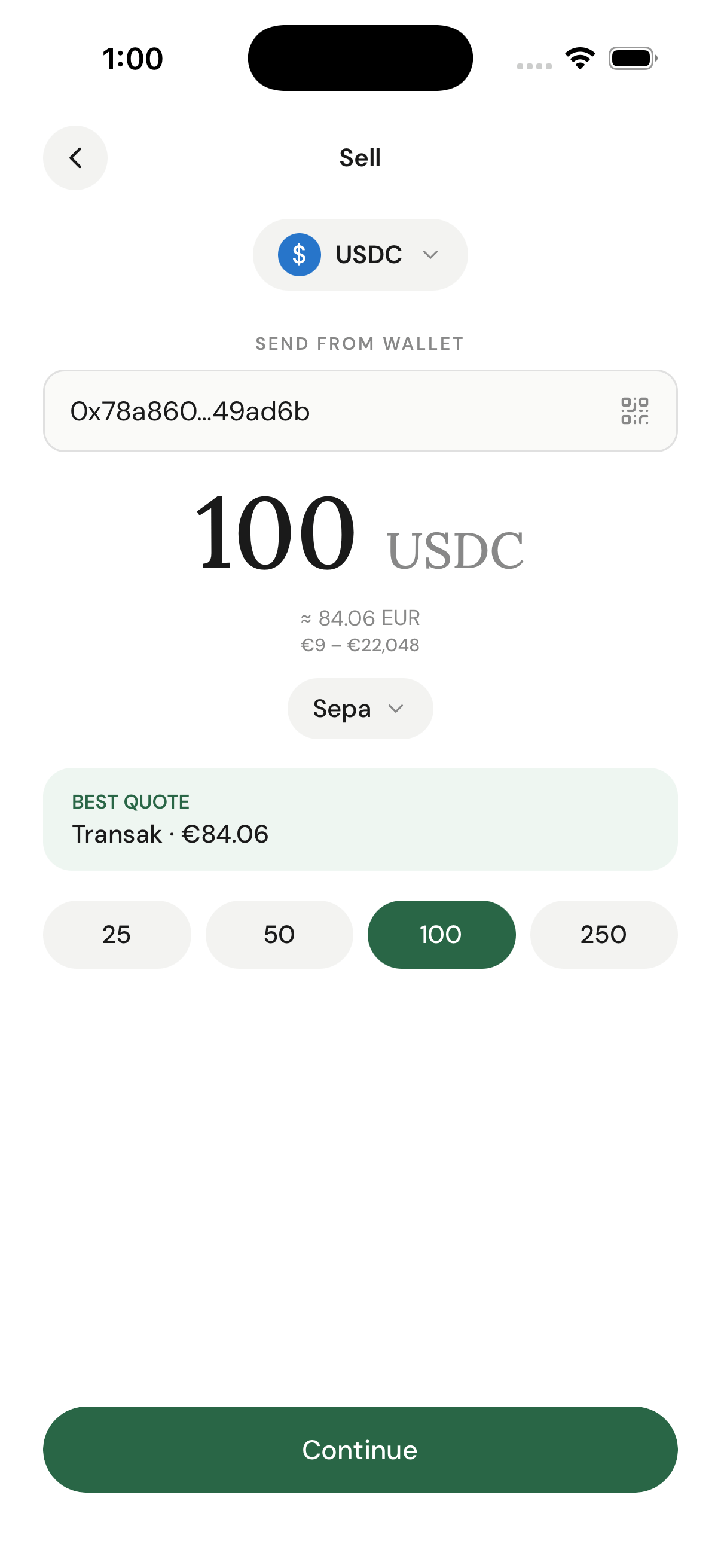 **Off-ramp ordering trap:** put `source = crypto` and `destination = fiat`. Putting fiat first returns **HTTP 200 with an empty `[]`** and silently breaks the whole sell screen.
```text theme={null}
GET /network-partner/supported/routes/CRYPTO_OFFRAMP/{country}/{crypto}/{fiat}
```
Consume `route.paymentMethods[].name` (payout rails), `...limits` (validate the amount), and `partner`.
```text theme={null}
GET /network-partner/supported/payment-methods?category=CRYPTO_OFFRAMP&country={country}¤cyCode={fiat}
```
`currencyCode` here is the **payout** fiat. Choose a payout rail and send its `method` (e.g. `ACH`, `SEPA`, `LOCAL_BANK_TRANSFER`, `PAYOUT_TO_CARD`) as `paymentMethodType` — never `name`. Prefer a `headlessSupported` rail when offered.
The source/destination ordering is what makes this a sell: `sourceCurrencyCode` is crypto, `destinationCurrencyCode` is fiat. `sourceAmount` is a **number** in crypto units.
```bash theme={null}
curl -X POST 'https://api-sb.meld.io/payments/crypto/quote' \
-H 'Authorization: BASIC {apiKey}' \
-H 'Content-Type: application/json' \
-H 'Accept: application/json' \
-H 'Meld-Version: 2026-02-03' \
-d '{
"countryCode": "US",
"sourceCurrencyCode": "USDC",
"destinationCurrencyCode": "USD",
"sourceAmount": 250,
"paymentMethodType": "ACH",
"externalCustomerId": "user_123"
}'
```
`destinationAmount` on each quote is the fiat the user receives. Capture the chosen quote's `serviceProvider`.
Create the session with `sessionType: "SELL"`. Here `sessionData.walletAddress` is the user's **own** wallet (the one they send crypto from / are refunded to) — not a deposit address. `sourceAmount` is a **string**.
```bash theme={null}
curl -X POST 'https://api-sb.meld.io/crypto/session/widget' \
-H 'Authorization: BASIC {apiKey}' \
-H 'Content-Type: application/json' \
-H 'Accept: application/json' \
-H 'Meld-Version: 2026-02-03' \
-d '{
"sessionType": "SELL",
"sessionData": {
"countryCode": "US",
"sourceCurrencyCode": "USDC",
"destinationCurrencyCode": "USD",
"sourceAmount": "250",
"paymentMethodType": "ACH",
"serviceProvider": "TRANSAK",
"walletAddress": "0xfCFAa8059080D01b27ccA2B1fA086df0853397E6",
"redirectUrl": "https://your-domain.example/transaction-complete"
},
"externalCustomerId": "user_123",
"externalSessionId": "session_789"
}'
```
Open `serviceProviderWidgetUrl`; the provider collects payout-bank details and runs KYC. After the widget completes, fetch the transaction (or look it up by your `externalSessionId`) and read the **deposit address** from `cryptoDetails.offrampDestinationWalletAddress`:
```js theme={null}
// Response is wrapped: { transaction: { cryptoDetails: {...} } }
const depositAddress = transaction.cryptoDetails.offrampDestinationWalletAddress;
```
**Never use `cryptoDetails.walletAddress`** — for off-ramp that is the customer's own origin wallet, not the deposit address. Display `offrampDestinationWalletAddress` (as a QR code plus a copyable string) and instruct the user to send **exactly** the quoted crypto amount to it. A wrong address or amount means lost funds — show a hard warning.
## Quote ranking (Ramp Intelligence)
`POST /payments/crypto/quote` returns multiple provider quotes. Each carries a `rampScore` (via `rampIntelligence.rampScore`) representing the likelihood of transaction success based on historical conversion rates, provider reliability, location and payment-method compatibility, and real-time provider performance.
```json Quote (abridged) theme={null}
{
"transactionType": "CRYPTO_PURCHASE",
"sourceAmount": 200.00,
"sourceCurrencyCode": "USD",
"destinationAmount": 199.83,
"destinationCurrencyCode": "USDC",
"exchangeRate": 1.0008,
"totalFee": 4.17,
"networkFee": 0.17,
"transactionFee": 2,
"partnerFee": 2,
"paymentMethodType": "CREDIT_DEBIT_CARD",
"serviceProvider": "TRANSAK",
"rampIntelligence": { "rampScore": 20.00, "lowKyc": false }
}
```
* **`rampScore`** — Meld's recommendation score (higher = better conversion likelihood).
* **`lowKyc`** — whether the provider requires minimal identity verification.
```javascript theme={null}
// Sort by Meld's recommended ranking for best results
function rankQuotesByMeldScore(quotes) {
return quotes.sort((a, b) => {
const aScore = a.rampIntelligence?.rampScore ?? 0;
const bScore = b.rampIntelligence?.rampScore ?? 0;
if (aScore !== bScore) return bScore - aScore; // higher rampScore first
return b.destinationAmount - a.destinationAmount; // tie-break: more received
});
}
```
Display the highest `rampScore` quote first to maximize transaction success rates. For off-ramp, the same ranking applies — just compare `destinationAmount` (fiat received) as the tie-break.
📊 **Learn More:** See [Ramp Intelligence](/docs/stablecoins/white-label-api-integration/whitelabel-api-guide/ramp-intelligence) for advanced ranking strategies.
## Launch the provider UI
When the session is created, open the provider's payment UI in a webview, new tab, or redirect.
`widgetUrl` returns a Meld URL that iframes the provider's URL (or full-redirects for providers that block iframing). `serviceProviderWidgetUrl` returns the provider's URL directly. You can launch either; we recommend `serviceProviderWidgetUrl`. The only difference between buy and sell is the `sessionType` you sent when creating the session.
```javascript theme={null}
function launchProviderUI(sessionResponse) {
window.open(
sessionResponse.serviceProviderWidgetUrl,
'meld-widget',
'width=450,height=700,scrollbars=yes,resizable=yes'
);
// Meld redirects the user back when the flow completes;
// close the popup based on your application's flow.
}
```
```javascript theme={null}
function launchMobileProviderUI(sessionResponse) {
// Open the provider URL in an in-app browser / webview,
// or full-redirect the current page.
window.location.href = sessionResponse.serviceProviderWidgetUrl;
}
```
**Redirect Domain Whitelisting:** Some providers require redirect-domain whitelisting. Contact Meld support if provider UIs don't redirect back properly to your `redirectUrl`.
**Transaction Completion:** Meld does not send completion events or use redirect parameters. When the flow is complete, Meld simply redirects the user back to your `redirectUrl`. Track transaction status through webhooks, not redirect handling.
## Track the transaction
Monitor progress and update your UI as the user completes the flow.
**Webhook Setup Required:** Sign up for webhooks in the Meld Dashboard. You receive a webhook each time a transaction is created or updated. See [Webhook events](/docs/stablecoins/for-all-products/webhook-events) for payload examples.
Use the webhook as a trigger to fetch the full transaction. Match the inbound event/redirect to your `externalSessionId`.
```javascript theme={null}
// Webhook endpoint receives transaction updates
app.post('/webhook/meld', async (req, res) => {
// The transaction id is nested under `payload` on the webhook event.
const { paymentTransactionId, externalCustomerId } = req.body.payload;
const tx = await fetchTransaction(paymentTransactionId);
updateTransaction(paymentTransactionId, tx);
notifyUser(externalCustomerId, { transactionId: paymentTransactionId, status: tx.status });
res.status(200).send('OK');
});
// Fetch transaction details (unchanged endpoint)
async function fetchTransaction(transactionId) {
const res = await fetch(
`https://api-sb.meld.io/payments/transactions/${transactionId}`,
{ headers: { 'Authorization': `BASIC ${apiKey}`, 'Meld-Version': '2026-02-03' } }
);
const body = await res.json();
return body.transaction; // response is wrapped in { transaction: {...} }
}
```
The response is **wrapped** in `{ "transaction": { ... } }`. The inner object carries status, amounts, and a `cryptoDetails` block. **`cryptoDetails.walletAddress` is direction-dependent**: on **on-ramp** it's the user's destination wallet (where the crypto is delivered); on **off-ramp** it's the user's origin wallet (where they send from / receive refunds). For the off-ramp deposit address, read `cryptoDetails.offrampDestinationWalletAddress` — see [Off-ramp flow](#off-ramp-flow-sell) Step 6.
```json theme={null}
{
"transaction": {
"id": "WePLapZetkn1hfeKFScf3T",
"transactionType": "CRYPTO_PURCHASE",
"status": "SETTLED",
"sourceAmount": 200,
"sourceCurrencyCode": "USD",
"destinationAmount": 199.83,
"destinationCurrencyCode": "USDC",
"paymentMethodType": "CREDIT_DEBIT_CARD",
"serviceProvider": "TRANSAK",
"externalSessionId": "session_456",
"cryptoDetails": {
"walletAddress": "0xfCFAa8059080D01b27ccA2B1fA086df0853397E6",
"offrampDestinationWalletAddress": null,
"blockchainTransactionId": "0xabc...def",
"chainId": "1",
"networkFeeInUsd": 0.17,
"transactionFeeInUsd": 2,
"partnerFeeInUsd": 2,
"totalFeeInUsd": 4.17
}
}
}
```
```javascript theme={null}
function getStatusMessage(status) {
return {
PENDING: 'Processing your transaction…',
SETTLING: 'Finalizing transfer…',
SETTLED: 'Complete!',
FAILED: 'Transaction failed. Please try again.',
CANCELLED: 'Transaction was cancelled.'
}[status] || 'Transaction status updated.';
}
```
For off-ramp, the same endpoint also carries the deposit address (`cryptoDetails.offrampDestinationWalletAddress`) used in the sell flow. See [Off-ramp flow](#off-ramp-flow-sell) Step 6.
**Status Reference:** See [Transaction Statuses](/docs/stablecoins/for-all-products/transaction-statuses) for complete definitions.
## API response caching guide
Cache static discovery data; never cache pricing, sessions, or transaction state.
| Cache | Endpoints | TTL guidance |
| ------------- | ----------------------------------------------------------------------------------------------------------------------------- | --------------------------------------------------------------------------------------------------------------- |
| Long (static) | `supported/countries`, `defaults/{country}/{category}`, `supported/currencies` (FIAT and CRYPTO), `supported/payment-methods` | Up to 1 week — these rarely change. |
| Short | `supported/routes` | Minutes to hours — routes carry **limits**, which change more often. Refetch before validating a user's amount. |
| Never | `POST /payments/crypto/quote`, `POST /crypto/session/widget`, `GET /payments/transactions/{id}` | Always fresh. |
Key caches by every parameter that changes the response — `category`, `country`, `type`, `currencyCode`, and (for routes) `source`/`destination`/`subdivision` — so a buy cache entry never serves a sell request.
```javascript theme={null}
class MeldDiscoveryCache {
constructor() { this.cache = new Map(); }
async get(key, ttlMs, fetcher) {
const hit = this.cache.get(key);
if (hit && Date.now() - hit.timestamp < ttlMs) return hit.data;
const data = await fetcher();
this.cache.set(key, { data, timestamp: Date.now() });
return data;
}
}
```
## Best practices & tips
### Performance
* **Cache static discovery** for up to 1 week; keep `supported/routes` on a short TTL because limits change.
* **Debounce quote requests** while the user types an amount.
* **Preload country/currency data** on app startup.
### User experience
* **Show loading states** during API calls.
* **Display fees clearly** before the user commits.
* **Validate amounts** against `route.paymentMethods[].limits` in the correct currency.
* **Handle errors gracefully** with retry options.
### Error handling
```javascript theme={null}
async function handleAPIError(error, endpoint) {
const errorMap = {
401: 'Invalid API key or authentication failed',
403: 'Access forbidden — check account permissions',
429: 'Rate limit exceeded — please wait and retry',
500: 'Server error — please try again later'
};
console.error(`API Error (${endpoint}):`, error);
showErrorToUser(errorMap[error.status] || 'Unknown error occurred');
}
```
**Two discovery pitfalls to guard against:**
* **`NO_VALID_QUOTES`** — usually means you sent a `paymentMethodType` that isn't valid for the country/currency, or sent a display `name` instead of the canonical `method` id. Re-derive the method from `supported/payment-methods` / route methods.
* **Empty `200 []` from `supported/routes`** — almost always wrong `source`/`destination` ordering. On-ramp is fiat → crypto; off-ramp is crypto → fiat. An empty array is silent, not a 404 — assert it's non-empty before rendering rails or limits.
### Security
* **Never expose API keys** in frontend code — proxy Meld calls through your backend.
* **Validate all user inputs** before API calls.
* **Use HTTPS only** for API communications.
* **Implement rate limiting** to prevent abuse.
## Next steps
### Testing your implementation
* [**Sandbox testing credentials**](/docs/stablecoins/sandbox-guide/test) — test cards, wallets, and KYC triggers
### Advanced features
* [**Webhook events**](/docs/stablecoins/for-all-products/webhook-events) — real-time updates
* [**Dashboard data**](/docs/stablecoins/additional-information/dashboard-data) — track performance
* [**Ramp Intelligence**](/docs/stablecoins/white-label-api-integration/whitelabel-api-guide/ramp-intelligence) — improve success rates
### Production deployment
* [**Service-provider setup**](/docs/stablecoins/for-all-products/service-provider-setup) — configure additional providers
## Support & resources
* [**FAQ**](/docs/stablecoins/faq) — common questions answered
*This guide provides everything needed to build a production-ready buy and sell interface. Most teams complete their custom UI integration within 1-2 weeks using this approach.*
**Off-ramp ordering trap:** put `source = crypto` and `destination = fiat`. Putting fiat first returns **HTTP 200 with an empty `[]`** and silently breaks the whole sell screen.
```text theme={null}
GET /network-partner/supported/routes/CRYPTO_OFFRAMP/{country}/{crypto}/{fiat}
```
Consume `route.paymentMethods[].name` (payout rails), `...limits` (validate the amount), and `partner`.
```text theme={null}
GET /network-partner/supported/payment-methods?category=CRYPTO_OFFRAMP&country={country}¤cyCode={fiat}
```
`currencyCode` here is the **payout** fiat. Choose a payout rail and send its `method` (e.g. `ACH`, `SEPA`, `LOCAL_BANK_TRANSFER`, `PAYOUT_TO_CARD`) as `paymentMethodType` — never `name`. Prefer a `headlessSupported` rail when offered.
The source/destination ordering is what makes this a sell: `sourceCurrencyCode` is crypto, `destinationCurrencyCode` is fiat. `sourceAmount` is a **number** in crypto units.
```bash theme={null}
curl -X POST 'https://api-sb.meld.io/payments/crypto/quote' \
-H 'Authorization: BASIC {apiKey}' \
-H 'Content-Type: application/json' \
-H 'Accept: application/json' \
-H 'Meld-Version: 2026-02-03' \
-d '{
"countryCode": "US",
"sourceCurrencyCode": "USDC",
"destinationCurrencyCode": "USD",
"sourceAmount": 250,
"paymentMethodType": "ACH",
"externalCustomerId": "user_123"
}'
```
`destinationAmount` on each quote is the fiat the user receives. Capture the chosen quote's `serviceProvider`.
Create the session with `sessionType: "SELL"`. Here `sessionData.walletAddress` is the user's **own** wallet (the one they send crypto from / are refunded to) — not a deposit address. `sourceAmount` is a **string**.
```bash theme={null}
curl -X POST 'https://api-sb.meld.io/crypto/session/widget' \
-H 'Authorization: BASIC {apiKey}' \
-H 'Content-Type: application/json' \
-H 'Accept: application/json' \
-H 'Meld-Version: 2026-02-03' \
-d '{
"sessionType": "SELL",
"sessionData": {
"countryCode": "US",
"sourceCurrencyCode": "USDC",
"destinationCurrencyCode": "USD",
"sourceAmount": "250",
"paymentMethodType": "ACH",
"serviceProvider": "TRANSAK",
"walletAddress": "0xfCFAa8059080D01b27ccA2B1fA086df0853397E6",
"redirectUrl": "https://your-domain.example/transaction-complete"
},
"externalCustomerId": "user_123",
"externalSessionId": "session_789"
}'
```
Open `serviceProviderWidgetUrl`; the provider collects payout-bank details and runs KYC. After the widget completes, fetch the transaction (or look it up by your `externalSessionId`) and read the **deposit address** from `cryptoDetails.offrampDestinationWalletAddress`:
```js theme={null}
// Response is wrapped: { transaction: { cryptoDetails: {...} } }
const depositAddress = transaction.cryptoDetails.offrampDestinationWalletAddress;
```
**Never use `cryptoDetails.walletAddress`** — for off-ramp that is the customer's own origin wallet, not the deposit address. Display `offrampDestinationWalletAddress` (as a QR code plus a copyable string) and instruct the user to send **exactly** the quoted crypto amount to it. A wrong address or amount means lost funds — show a hard warning.
## Quote ranking (Ramp Intelligence)
`POST /payments/crypto/quote` returns multiple provider quotes. Each carries a `rampScore` (via `rampIntelligence.rampScore`) representing the likelihood of transaction success based on historical conversion rates, provider reliability, location and payment-method compatibility, and real-time provider performance.
```json Quote (abridged) theme={null}
{
"transactionType": "CRYPTO_PURCHASE",
"sourceAmount": 200.00,
"sourceCurrencyCode": "USD",
"destinationAmount": 199.83,
"destinationCurrencyCode": "USDC",
"exchangeRate": 1.0008,
"totalFee": 4.17,
"networkFee": 0.17,
"transactionFee": 2,
"partnerFee": 2,
"paymentMethodType": "CREDIT_DEBIT_CARD",
"serviceProvider": "TRANSAK",
"rampIntelligence": { "rampScore": 20.00, "lowKyc": false }
}
```
* **`rampScore`** — Meld's recommendation score (higher = better conversion likelihood).
* **`lowKyc`** — whether the provider requires minimal identity verification.
```javascript theme={null}
// Sort by Meld's recommended ranking for best results
function rankQuotesByMeldScore(quotes) {
return quotes.sort((a, b) => {
const aScore = a.rampIntelligence?.rampScore ?? 0;
const bScore = b.rampIntelligence?.rampScore ?? 0;
if (aScore !== bScore) return bScore - aScore; // higher rampScore first
return b.destinationAmount - a.destinationAmount; // tie-break: more received
});
}
```
Display the highest `rampScore` quote first to maximize transaction success rates. For off-ramp, the same ranking applies — just compare `destinationAmount` (fiat received) as the tie-break.
📊 **Learn More:** See [Ramp Intelligence](/docs/stablecoins/white-label-api-integration/whitelabel-api-guide/ramp-intelligence) for advanced ranking strategies.
## Launch the provider UI
When the session is created, open the provider's payment UI in a webview, new tab, or redirect.
`widgetUrl` returns a Meld URL that iframes the provider's URL (or full-redirects for providers that block iframing). `serviceProviderWidgetUrl` returns the provider's URL directly. You can launch either; we recommend `serviceProviderWidgetUrl`. The only difference between buy and sell is the `sessionType` you sent when creating the session.
```javascript theme={null}
function launchProviderUI(sessionResponse) {
window.open(
sessionResponse.serviceProviderWidgetUrl,
'meld-widget',
'width=450,height=700,scrollbars=yes,resizable=yes'
);
// Meld redirects the user back when the flow completes;
// close the popup based on your application's flow.
}
```
```javascript theme={null}
function launchMobileProviderUI(sessionResponse) {
// Open the provider URL in an in-app browser / webview,
// or full-redirect the current page.
window.location.href = sessionResponse.serviceProviderWidgetUrl;
}
```
**Redirect Domain Whitelisting:** Some providers require redirect-domain whitelisting. Contact Meld support if provider UIs don't redirect back properly to your `redirectUrl`.
**Transaction Completion:** Meld does not send completion events or use redirect parameters. When the flow is complete, Meld simply redirects the user back to your `redirectUrl`. Track transaction status through webhooks, not redirect handling.
## Track the transaction
Monitor progress and update your UI as the user completes the flow.
**Webhook Setup Required:** Sign up for webhooks in the Meld Dashboard. You receive a webhook each time a transaction is created or updated. See [Webhook events](/docs/stablecoins/for-all-products/webhook-events) for payload examples.
Use the webhook as a trigger to fetch the full transaction. Match the inbound event/redirect to your `externalSessionId`.
```javascript theme={null}
// Webhook endpoint receives transaction updates
app.post('/webhook/meld', async (req, res) => {
// The transaction id is nested under `payload` on the webhook event.
const { paymentTransactionId, externalCustomerId } = req.body.payload;
const tx = await fetchTransaction(paymentTransactionId);
updateTransaction(paymentTransactionId, tx);
notifyUser(externalCustomerId, { transactionId: paymentTransactionId, status: tx.status });
res.status(200).send('OK');
});
// Fetch transaction details (unchanged endpoint)
async function fetchTransaction(transactionId) {
const res = await fetch(
`https://api-sb.meld.io/payments/transactions/${transactionId}`,
{ headers: { 'Authorization': `BASIC ${apiKey}`, 'Meld-Version': '2026-02-03' } }
);
const body = await res.json();
return body.transaction; // response is wrapped in { transaction: {...} }
}
```
The response is **wrapped** in `{ "transaction": { ... } }`. The inner object carries status, amounts, and a `cryptoDetails` block. **`cryptoDetails.walletAddress` is direction-dependent**: on **on-ramp** it's the user's destination wallet (where the crypto is delivered); on **off-ramp** it's the user's origin wallet (where they send from / receive refunds). For the off-ramp deposit address, read `cryptoDetails.offrampDestinationWalletAddress` — see [Off-ramp flow](#off-ramp-flow-sell) Step 6.
```json theme={null}
{
"transaction": {
"id": "WePLapZetkn1hfeKFScf3T",
"transactionType": "CRYPTO_PURCHASE",
"status": "SETTLED",
"sourceAmount": 200,
"sourceCurrencyCode": "USD",
"destinationAmount": 199.83,
"destinationCurrencyCode": "USDC",
"paymentMethodType": "CREDIT_DEBIT_CARD",
"serviceProvider": "TRANSAK",
"externalSessionId": "session_456",
"cryptoDetails": {
"walletAddress": "0xfCFAa8059080D01b27ccA2B1fA086df0853397E6",
"offrampDestinationWalletAddress": null,
"blockchainTransactionId": "0xabc...def",
"chainId": "1",
"networkFeeInUsd": 0.17,
"transactionFeeInUsd": 2,
"partnerFeeInUsd": 2,
"totalFeeInUsd": 4.17
}
}
}
```
```javascript theme={null}
function getStatusMessage(status) {
return {
PENDING: 'Processing your transaction…',
SETTLING: 'Finalizing transfer…',
SETTLED: 'Complete!',
FAILED: 'Transaction failed. Please try again.',
CANCELLED: 'Transaction was cancelled.'
}[status] || 'Transaction status updated.';
}
```
For off-ramp, the same endpoint also carries the deposit address (`cryptoDetails.offrampDestinationWalletAddress`) used in the sell flow. See [Off-ramp flow](#off-ramp-flow-sell) Step 6.
**Status Reference:** See [Transaction Statuses](/docs/stablecoins/for-all-products/transaction-statuses) for complete definitions.
## API response caching guide
Cache static discovery data; never cache pricing, sessions, or transaction state.
| Cache | Endpoints | TTL guidance |
| ------------- | ----------------------------------------------------------------------------------------------------------------------------- | --------------------------------------------------------------------------------------------------------------- |
| Long (static) | `supported/countries`, `defaults/{country}/{category}`, `supported/currencies` (FIAT and CRYPTO), `supported/payment-methods` | Up to 1 week — these rarely change. |
| Short | `supported/routes` | Minutes to hours — routes carry **limits**, which change more often. Refetch before validating a user's amount. |
| Never | `POST /payments/crypto/quote`, `POST /crypto/session/widget`, `GET /payments/transactions/{id}` | Always fresh. |
Key caches by every parameter that changes the response — `category`, `country`, `type`, `currencyCode`, and (for routes) `source`/`destination`/`subdivision` — so a buy cache entry never serves a sell request.
```javascript theme={null}
class MeldDiscoveryCache {
constructor() { this.cache = new Map(); }
async get(key, ttlMs, fetcher) {
const hit = this.cache.get(key);
if (hit && Date.now() - hit.timestamp < ttlMs) return hit.data;
const data = await fetcher();
this.cache.set(key, { data, timestamp: Date.now() });
return data;
}
}
```
## Best practices & tips
### Performance
* **Cache static discovery** for up to 1 week; keep `supported/routes` on a short TTL because limits change.
* **Debounce quote requests** while the user types an amount.
* **Preload country/currency data** on app startup.
### User experience
* **Show loading states** during API calls.
* **Display fees clearly** before the user commits.
* **Validate amounts** against `route.paymentMethods[].limits` in the correct currency.
* **Handle errors gracefully** with retry options.
### Error handling
```javascript theme={null}
async function handleAPIError(error, endpoint) {
const errorMap = {
401: 'Invalid API key or authentication failed',
403: 'Access forbidden — check account permissions',
429: 'Rate limit exceeded — please wait and retry',
500: 'Server error — please try again later'
};
console.error(`API Error (${endpoint}):`, error);
showErrorToUser(errorMap[error.status] || 'Unknown error occurred');
}
```
**Two discovery pitfalls to guard against:**
* **`NO_VALID_QUOTES`** — usually means you sent a `paymentMethodType` that isn't valid for the country/currency, or sent a display `name` instead of the canonical `method` id. Re-derive the method from `supported/payment-methods` / route methods.
* **Empty `200 []` from `supported/routes`** — almost always wrong `source`/`destination` ordering. On-ramp is fiat → crypto; off-ramp is crypto → fiat. An empty array is silent, not a 404 — assert it's non-empty before rendering rails or limits.
### Security
* **Never expose API keys** in frontend code — proxy Meld calls through your backend.
* **Validate all user inputs** before API calls.
* **Use HTTPS only** for API communications.
* **Implement rate limiting** to prevent abuse.
## Next steps
### Testing your implementation
* [**Sandbox testing credentials**](/docs/stablecoins/sandbox-guide/test) — test cards, wallets, and KYC triggers
### Advanced features
* [**Webhook events**](/docs/stablecoins/for-all-products/webhook-events) — real-time updates
* [**Dashboard data**](/docs/stablecoins/additional-information/dashboard-data) — track performance
* [**Ramp Intelligence**](/docs/stablecoins/white-label-api-integration/whitelabel-api-guide/ramp-intelligence) — improve success rates
### Production deployment
* [**Service-provider setup**](/docs/stablecoins/for-all-products/service-provider-setup) — configure additional providers
## Support & resources
* [**FAQ**](/docs/stablecoins/faq) — common questions answered
*This guide provides everything needed to build a production-ready buy and sell interface. Most teams complete their custom UI integration within 1-2 weeks using this approach.*