

Meld Checkout Customization & Advanced Configuration
Customize your Meld Checkout Integration appearance, behavior, and user experience through dashboard settings and advanced configuration options.Meld Support Required
Contact Meld for these advanced customizations:Account Logo
Update your account logo in the top-left corner of the UI. Process: Send your logo file (PNG/SVG preferred) to Meld support with specifications:- Size: 200x60px recommended
- Format: PNG with transparent background or SVG
- Colors: Optimized for both light and dark themes
Flow Management
Control which transaction types are available:- Disable Buy Flow - Show only sell/offramp functionality
- Disable Sell Flow - Show only buy/onramp functionality
Quote Management
Customize provider quote display:- Quote limits - Cap the number of quotes returned to the checkout. Applied when quotes are generated, so the cap holds for every Meld Checkout embed on the account.
Quotes are ordered by Ramp Intelligence
rampScore, best first, and the quote limit keeps the top-scoring entries. Ordering is not configurable per account.Default Settings
Set account-wide defaults:- Default redirect URL - Fallback URL used when an embed does not pass its own
redirectUrl. Applied when the provider session is created, so it covers every Meld Checkout embed on the account.
Full-screen layout is a per-URL setting, not an account preference. Pass
fullScreen=true on each Meld Checkout URL. See URL parameters → fullScreen.Not Currently Available
- Provider prioritization - Promoting specific providers to the top of the list. Quote order is set by
rampScoreand cannot be overridden per account. - Custom Flow Logic - Advanced routing based on user profile
- Token Restrictions - Chain-specific tokens, a curated token list, or highlighting partner tokens
- Custom provider branding - Special provider highlighting
- Theme defaults - Account-wide light/dark mode preference
Dashboard Customization
Access these options in the Meld Dashboard → Developer Tab → Preferences:Visual Branding
Button Color
Customize the primary Buy or Sell CTA button color at the bottom of the UI.Button Text Color
Set the text color inside the CTA button for optimal contrast.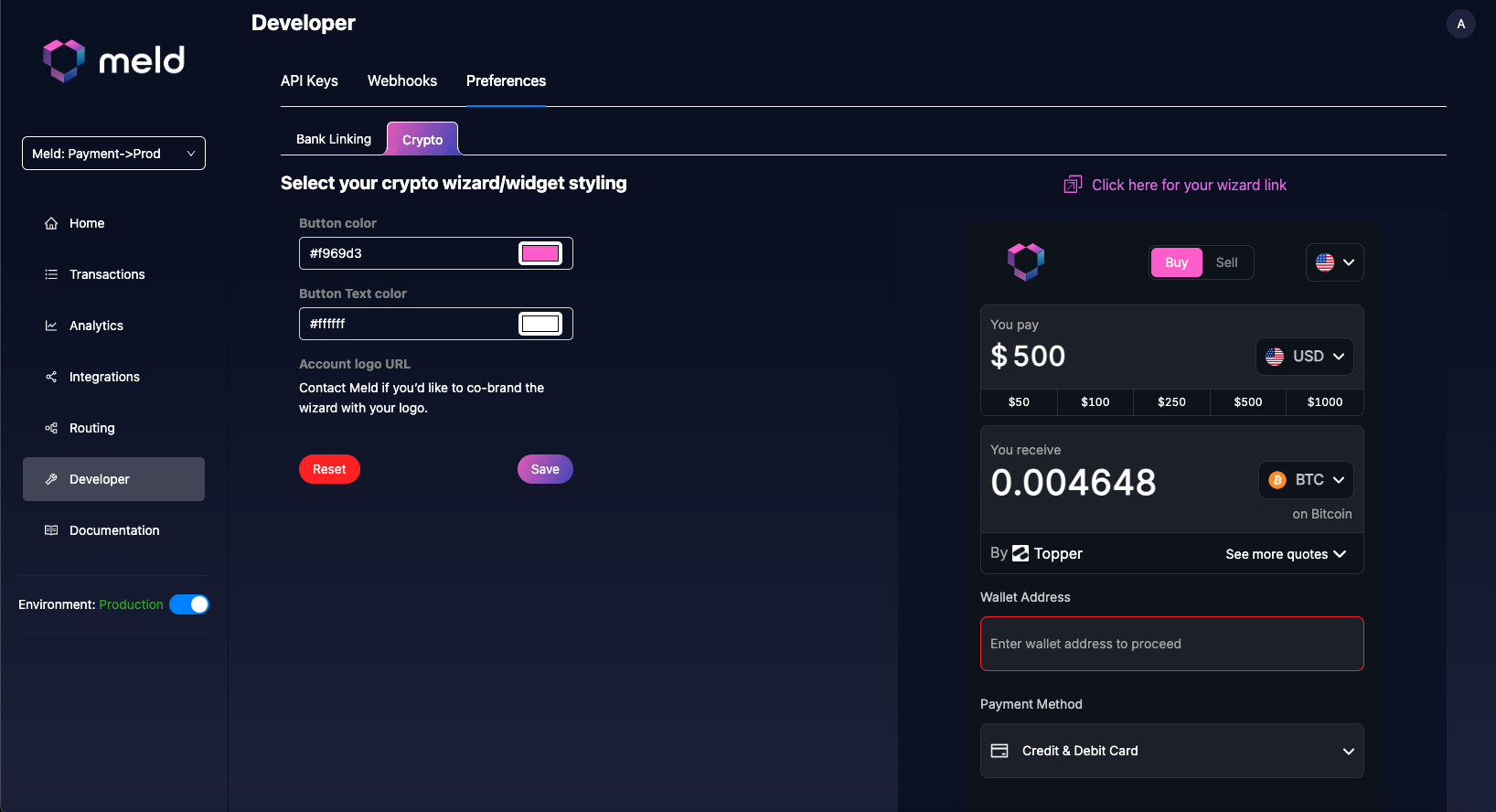 Reset Option: Use the Reset button to restore default values at any time.
Theme Configuration
Light/Dark Mode Implementation
Control the UI appearance with the theme parameter:Mobile Optimization
Deep Link Configuration
Seamlessly return users to your mobile app after transactions:Responsive Implementation
Optimize the UI display for different screen sizes:Mobile iframe Considerations
fullScreen=true and size the iframe to the viewport height:
Analytics & Tracking
Customer Identification Strategy
Track users across sessions for analytics:Conversion Optimization
Pre-fill known information to improve conversion rates:Advanced Use Cases
Marketplace Integration
Configure the Meld Checkout for NFT marketplace or token sales:Multi-Currency Support
Offer multiple cryptocurrency options:Geographic Customization
Optimize currency and amounts for specific regions:Note: Country is automatically detected in the Meld Checkout Integration. Use countryCode parameter only when you need to override the detection for special cases.
Contact Meld
For advanced customizations requiring Meld support: Email/Slack/Telegram: Contact your integration specialist or support teamDocumentation: Reference this guide when making requests
Request Template:
Implementation Complete! Your Meld Checkout Integration is now optimized for your specific use case and user experience requirements.