

End-to-end guide for integrating Meld’s standing virtual-account onramp (fiat → crypto) over the Payment and Account APIs.A provider provisions reusable bank deposit details for the user. When the user sends fiat to that account, the provider converts it and sends crypto to the destination wallet you registered. You present your own UI — there is no Meld-hosted widget. Fetch deposit instructions once per customer + provider + payment method + currency pair + destination wallet. The user reuses the same account for later deposits.
API compatibility: New fields may appear in responses without a version bump. Use flexible JSON parsing and do not reject unknown properties. Breaking changes ship under a dated Meld-Version.
Before you begin
- You have a Meld API key with payment access (sandbox first, production for go-live)
For the sandbox testing guide, please refer to Virtual Account Flow Testing Credentials
- You have a webhook endpoint configured in Developer → Webhooks in the dashboard
- At least one headless-capable onramp provider is enabled on your account (for example Noah, Due Network, Brale, or Yellowcard)
- Your account has headless onramps enabled (
account_preference.crypto.headlessOnrampsEnabled). Reach out to Meld support to confirm this is enabled. - If you are using Meld to KYC, then your Meld account must have Sumsub configured. Reach out to Meld for help enabling this if needed.
Flow overview
One time per user
- Create a customer (and address when required).
- Configure webhooks.
- Complete KYC for the provider(s) you will use.
- Fetch virtual account details for customer + provider + payment method + currency pair + destination wallet.
Every deposit
- (Optional) Get a quote for the amount the user wants to send.
- User sends fiat to the same stored VA details.
- Track via webhooks / Transactions API.
1. Create a customer
Endpoint:POST /accounts/customers
Once per end user. Reuse the same Meld customerId for KYC, quotes, and deposit instructions.
Required fields
id. You may also use externalCustomerId on some endpoints when supported.
Add a customer address (required for Due Network)
If you plan to use Due Network, add a residential address before KYC. Due uses addresscountry when creating / sharing the provider customer.
Endpoint: POST /accounts/customers/{customerId}/addresses
2. Configure webhooks
Set this up before KYC so you receiveCUSTOMER_KYC_STATUS_CHANGE as well as transaction events.
In the Meld dashboard (Developer → Webhooks), subscribe at minimum to:
CUSTOMER_KYC_STATUS_CHANGETRANSACTION_CRYPTO_PENDINGTRANSACTION_CRYPTO_TRANSFERRINGTRANSACTION_CRYPTO_COMPLETETRANSACTION_CRYPTO_FAILED
3. KYC
Standing virtual-account providers use ASYNC KYC: initiate once per (customer, provider) before fetching deposit instructions, then wait for provider KYCAPPROVED.
Endpoints:
POST /accounts/customers/{customerId}/kyc/initiatePATCH /accounts/customers/{customerId}/kyc/initiate
Both modes share KYC to the providers listed in
kycShareProviders after Sumsub is approved. You still must wait for each share provider to reach APPROVED before deposit-instructions.
3a. HOSTED_URL — Meld returns a Sumsub link
url. Listen for CUSTOMER_KYC_STATUS_CHANGE.
3b. TOKEN_IMPORT — import an existing Sumsub applicant
url to open — Meld attaches the existing applicant and shares to kycShareProviders. Listen for CUSTOMER_KYC_STATUS_CHANGE the same way.
3c. After Sumsub — provider-specific KYC link
After Sumsub approval, KYC is shared tokycShareProviders. A provider may still require its own step (status PENDING). The link lives on the customer record:
Endpoint: GET /accounts/customers/{customerId}
Look up that provider in serviceProviderCustomers[]. When present, send the user to kyc.additionalInfo.HostedURL, then wait until that provider’s kyc.status is APPROVED.
Sample customer response (Sumsub approved; Noah still needs provider KYC):
CUSTOMER_KYC_STATUS_CHANGE webhooks and re-fetch the customer when a share provider moves to PENDING or APPROVED.
4. Get a quote (optional)
Endpoint:POST /payments/crypto/quote?integrationMode=HEADLESS
Header: Meld-Version: 2026-05-01
Note that Brale does not support quotes. All Brale transactions are 1:1 (USD to USD backed stablecoin).
customerId is optional. Pass it when available so ramp intelligence / previously-used scoring can use it.
Use quotes to show rates, fees, available providers / methods, and each provider’s kycMode.
Some providers (for example Brale) may not surface commercial quotes the same way; confirm available providers in Network Partner / quote responses for your account.
5. Fetch virtual account details
Endpoint:POST /payments/virtual-account/deposit-instructions
Call this once for that customer + provider + payment method + currency pair + destination wallet. Store the returned bank details. Do not call again for each deposit unless that combination changes.
Idempotency (recommended): X-Idempotency-Key: <uuid>
- Successful create / return → HTTP 201
- Same key after success → cached body, HTTP 200
Request (ACH example)
Response (ACH example)
receivingBankInformation (typed fields) and any extras in serviceProviderDetails. The user sends fiat from their bank app. Meld and the provider do not collect the user’s bank login credentials.
Response (SEPA example)
iban / bic (and bank / account-holder name) from receivingBankInformation. Some providers also return a payment reference (for example Due Network’s memo in serviceProviderDetails) — the payer must include this reference on the transfer so the provider can correlate funds.
After you have the details
- Store the VA details against your user.
- On later deposits: optional quote → show the same account / routing (or IBAN) → user sends fiat.
- Listen for transaction webhooks — no new deposit-instructions call unless destination wallet, currencies, provider, or payment method changes.
Testing in sandbox: you cannot send real fiat to the account, so call the simulate endpoint to create a test deposit instead — see Simulate a deposit.
6. Tracking
Webhook events (buy)
A deposit produces this sequence. Correlate every one of them withpaymentTransactionId.
Every event uses the same envelope and payload shape, with
eventType and payload.paymentTransactionStatus moving together:
Virtual account payloads carry no session fields.
sessionId and externalSessionId only exist for widget transactions, which are created from a session. A virtual account deposit has none, and the payload omits empty fields entirely rather than sending them as null — so do not key your handler on their presence.The payload also does not carry the order id. To go from a webhook back to the order, take paymentTransactionId, call GET /payments/transactions/{paymentTransactionId}, and read orderId from the transaction.Fetch the full transaction
Endpoint:GET /payments/transactions/{paymentTransactionId}
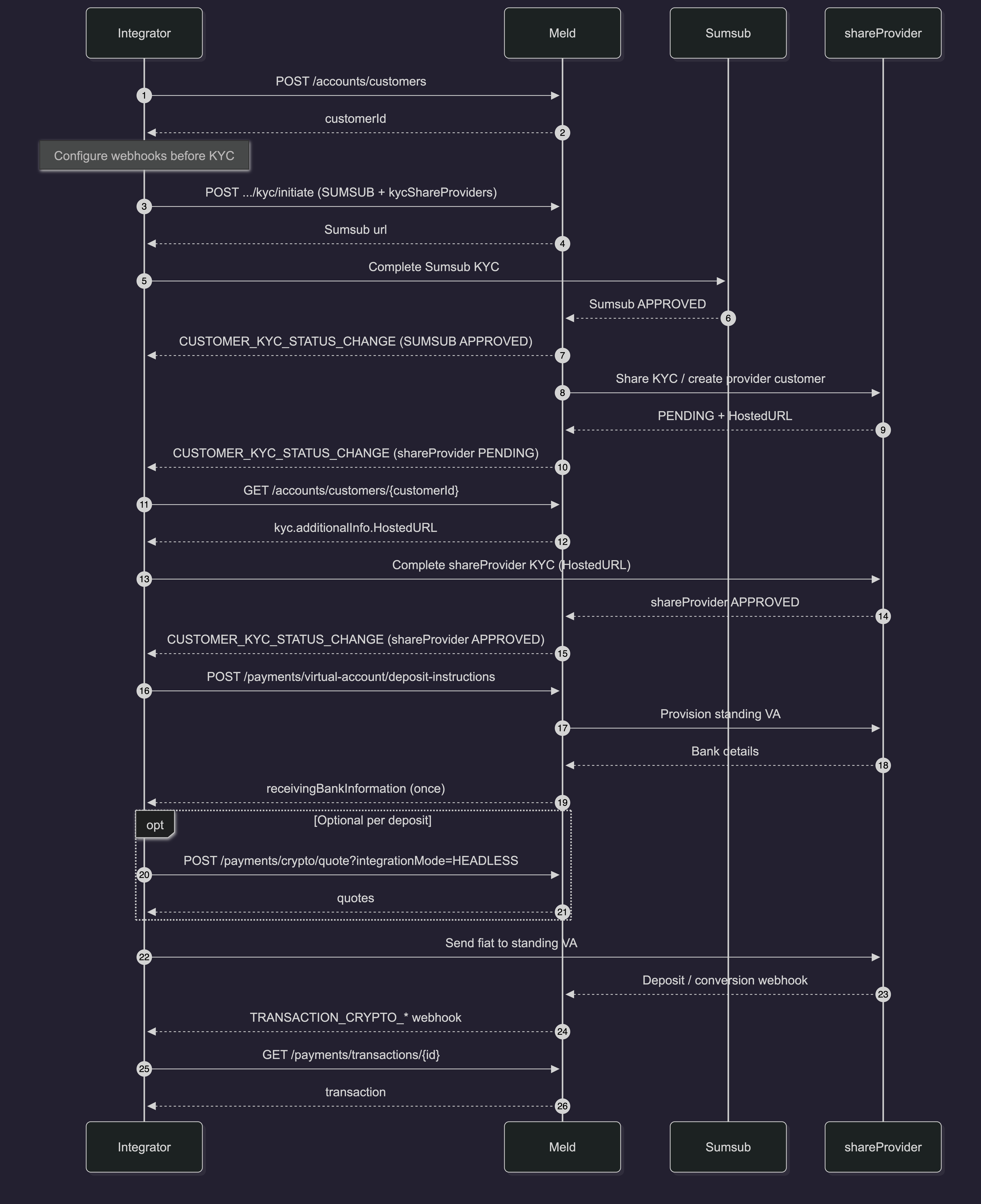
Sequence Diagram
Notes and limits
- Standing virtual accounts require
headlessOnrampsEnabledon the account. - Primary API:
POST /payments/virtual-account/deposit-instructions(fetch once, reuse). - Supported payment methods for this flow:
ACH,SEPA,PIX,MOBILE_MONEY. - Provider sandboxes do not move real money, but you can still complete a full onramp in sandbox for Noah and Due Network — see Simulate a deposit. For other providers you may stop at instruction issuance.