

End-to-end guide for integrating Meld’s headless offramp (crypto → fiat) over the Payment and Account APIs.This guide walks through customer creation, KYC, quoting, order creation, and webhook tracking for the headless offramp flow. Callers collect a provider deposit wallet address from Meld, have the user send crypto, and the provider pays out fiat to the bank / mobile money details you supplied.
Before you begin
- You have a Meld API key with payment access (sandbox first, production for go-live)
For the sandbox testing guide, please refer to Virtual Account Flow Testing Credentials
- You have a webhook endpoint configured in Developer → Webhooks in the dashboard
- At least one headless-capable offramp provider is enabled on your account (for example Noah, Due Network, Brale, or Yellowcard)
- If you are using Meld to KYC, then your Meld account must have Sumsub configured. Reach out to Meld for help enabling this if needed.
How it works
- Create a customer in the Account API. (one time per user)
- Configure webhooks (including KYC events). (one time)
- Complete KYC for that customer with the offramp provider. (one time per user / provider)
- Get a sell quote from the Payment API. (every transaction)
- Create a headless offramp order with fiat payout details. (every transaction)
- The end user sends crypto to the returned
walletAddress. (every transaction) - Track progress via webhooks and the Transactions API. (every transaction)
1. Create a customer
Endpoint:POST /accounts/customers
Once per end user. Reuse the same Meld customerId for all later KYC, quote, and order calls.
Required fields
id — offramp create requires customerId.
Add a customer address (required for Due Network)
If you plan to use Due Network, add a residential address before KYC. Due uses addresscountry when creating / sharing the provider customer.
Endpoint: POST /accounts/customers/{customerId}/addresses
subaccountCustomerId, externalSubaccountCustomerId.
2. Configure webhooks
Set this up before KYC so you receiveCUSTOMER_KYC_STATUS_CHANGE as well as transaction events.
In the Meld dashboard (Developer → Webhooks), subscribe at minimum to:
CUSTOMER_KYC_STATUS_CHANGETRANSACTION_CRYPTO_PENDINGTRANSACTION_CRYPTO_TRANSFERRINGTRANSACTION_CRYPTO_COMPLETETRANSACTION_CRYPTO_FAILED
3. KYC
Offramp providers that use Sumsub sharing (Noah, Due Network, and similar) follow the same ASYNC KYC pattern as virtual account onramp:- Initiate Sumsub via
POST /accounts/customers/{customerId}/kyc/initiate(once per customer) - Set
kycShareProvidersso approval is shared to the offramp provider - Wait for provider KYC
APPROVED(webhook orGET /accounts/customers/{customerId}) before the first sell order for that provider
Initiate KYC
Endpoints:POST /accounts/customers/{customerId}/kyc/initiatePATCH /accounts/customers/{customerId}/kyc/initiate
url when present. Listen for CUSTOMER_KYC_STATUS_CHANGE. If the offramp provider needs extra KYC, serviceProviderCustomers[].kyc.additionalInfo.HostedURL (when present) is where you send the user next; wait until that provider’s status is APPROVED before creating sell orders.
4. Get a quote (sell)
Endpoint:POST /payments/crypto/quote?integrationMode=HEADLESS
Header: Meld-Version: 2026-05-01
Note that Brale does not support quotes. All Brale transactions are 1:1 (USD to USD backed stablecoin).
customerId is optional on quote (same as widget crypto quote). Pass it when available so ramp intelligence / previously-used scoring can use it.
Sell quotes withFor a sell quote,integrationMode=HEADLESSincludeCRYPTO_VIRTUAL_ACCOUNT_OFFRAMPproviders (Noah, Due, and similar) as well as standard crypto offramp providers.
sourceCurrencyCode is crypto and destinationCurrencyCode is fiat:
serviceProvider and amounts for order creation. Quote coverage varies by provider and rail. Headless rows include kycMode (ASYNC or SYNC).
5. Create a headless offramp order
Endpoint:POST /crypto/order/headless/offramp
Auth: Payment charge permission on your API key / session.
Idempotency (recommended): X-Idempotency-Key: <uuid>
- Successful create → HTTP 201
- Same key after success → cached body, HTTP 200
- After a failed attempt that left an empty idempotency row → HTTP 425 TOO_EARLY — mint a new key
ACH / bank payout example
Address fields also accept snake_case aliasesstreet_line_1/street_line_2for compatibility with older examples.
SEPA details shape
Mobile money details shape
Payout type options
Provider support for each type is account- and rail-specific.
Response
6. User sends crypto
Instruct the user (or your ops/treasury process) to send exactly thesourceAmount / currency from the order request to walletAddress. Incorrect amount, asset, or network can prevent payout.
This is a required human (or treasury) action after order create — the order alone does not move crypto.
7. Track the transaction
Webhooks
An offramp produces this sequence. Correlate every one of them withpaymentTransactionId. For sell flows, transactionType is CRYPTO_SELL.
Every event uses the same envelope and payload shape, with
eventType and payload.paymentTransactionStatus moving together:
Headless payloads carry no session fields.
sessionId and externalSessionId only exist for widget transactions, which are created from a session. A headless order has none, and the payload omits empty fields entirely rather than sending them as null — so do not key your handler on their presence.Fetch the full transaction
Endpoint:GET /payments/transactions/{paymentTransactionId}
Use paymentTransactionId from the webhook.
Example response:
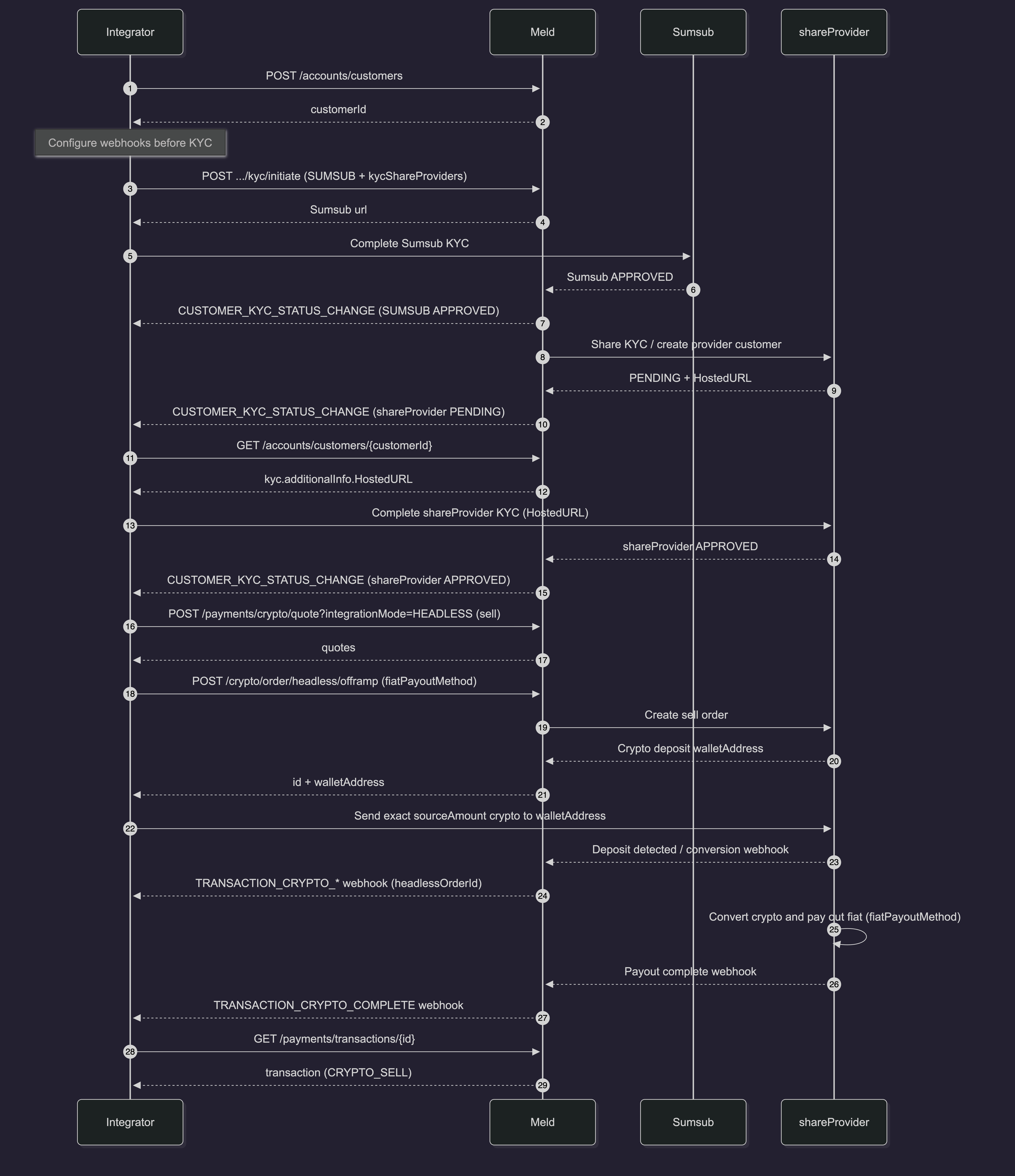
Sequence Diagram
Notes and limits
- Always wait for provider KYC approval before create when your provider requires shared Sumsub / onboarding.
- Send the correct crypto amount and network/asset implied by your quote and order — the provider matches inbound crypto to the order.
- Provider sandboxes may not complete full fiat settlement; you may stop at wallet address issuance.